Automatically keep track of every source, citation, and link in your presentations.
Sources Tracker is now available for free download on the Google Workspace Marketplace!
How It Works
All Your Sources in One View
The Sources Tracker sidebar automatically detects and organizes every link, file, and embedded resource in your Google Slides™ presentation.
Manage Google Docs™, Google Sheets™, PDFs, YouTube videos, Excel files, and other file types in a clean, structured list.
What you get:
- Automatic source detection across your entire deck
- Organized cards showing file type, title, and location
- Slide by slide navigation to jump to any source instantly
- One click scanning to update your source list
Perfect for research presentations, investor decks, and collaborative projects.
Overview of Sidebar Functionality
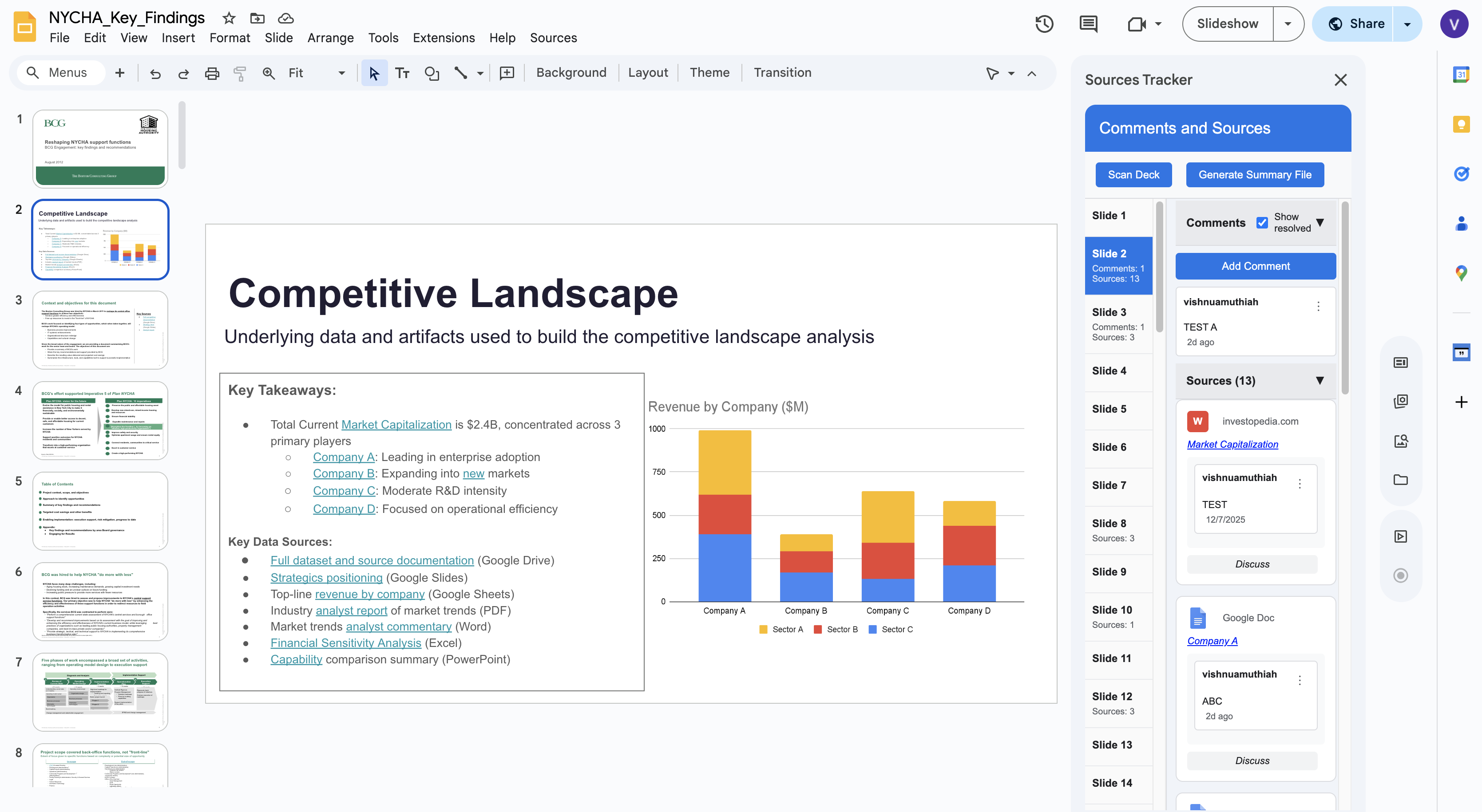
This view shows the full Sources Tracker sidebar integrated directly into Google Slides™. The panel automatically detects all embedded sources on a slide including Google Docs™, Google Sheets™, Microsoft Excel files, Microsoft Word files, PDFs, YouTube videos, links, and other file types in a structured list.
Each source card includes metadata, links, discussions, and navigation controls. The sidebar also provides a slide by slide index on the left, allowing users to jump between slides with comments or sources. At the top, users can click "Generate Summary File" to run a full deck scan and generate a summary file in Google Sheets™.
This view demonstrates the add-on's core value: bringing all citations, artifacts, and discussions into a unified workspace inside Google Slides™.
Export a Complete Summary in Seconds
Generate a comprehensive Google Sheets™ report of every source in your presentation with a single click.
Your export includes:
- Every URL with its title and file type
- Which slides contain each source
- All discussion threads and comments
- Audit ready format for compliance and review
Ideal for handoffs, documentation, and quality assurance.
Find Every Use of a Source Across Your Deck
Click any source to instantly see every slide where it appears. Sources Tracker highlights all slides using that link in gold, showing you exactly where your data, analysis, or citations are referenced.
Why this matters:
- Prevent inconsistencies across large presentations
- Ensure updates propagate everywhere
- Quickly audit which slides use specific data sources
- Maintain consistency in multi-author decks
Track Discussions Tied to Specific Sources
Add comments directly to sources, not just slides. Keep feedback organized and actionable with threaded discussions that stay connected to the exact file or link being discussed.
Comment features:
- Thread replies to keep conversations organized
- Resolve and unresolve comments with visual indicators
- Hide resolved comments to reduce clutter
- See comment history for every source
Great for team collaboration and stakeholder feedback.
Drag to Reorder and See Source Frequency
Keep your sources organized exactly how you want them. Drag and drop to reorder, and see at a glance when a source appears multiple times on the same slide.
Quality Control Features:
- Visual badges showing how many times a source appears
- Easy reordering with drag and drop
- Automatic duplicate detection
- Clean, organized source lists
Why Sources Tracker:
- Save time by eliminating manual link tracking
- Stay organized with all sources and discussions in one place
- Collaborate better with comments tied to specific sources
- Ensure quality by finding inconsistencies across your deck
- Privacy first. Your data never leaves Google's infrastructure
Get Started:
- Install Sources Tracker from the Google Workspace Marketplace
- Open any Google Slides™ presentation
- Go to Extensions > Sources Tracker > Scan Deck
- Your sidebar appears with all sources automatically detected
Perfect For:
- Research teams managing citations and data sources
- Consulting firms tracking client deliverables and references
- Academic presentations with multiple citations
- Executive decks requiring audit trails
- Collaborative projects with multiple contributors
Privacy, Security, and Terms of Service:
- Minimal permissions. Only accesses your current presentation
- No data sharing with third parties
- All data stored in Google's secure infrastructure
- You control your data and can delete it anytime
Read our Privacy Policy →
Read our Terms of Service →
Support
Questions or need help?
📧 Email: VishnuAMuthiah@gmail.com
⏱️ Response time: 48 to 72 hours